

Help us shape the future of cross-border shopping
SourceFlow connects you directly to China’s marketplaces. Shop in English, pay China prices in your own currency, and get items delivered to your door. Help us stress-test the experience before our public launch.
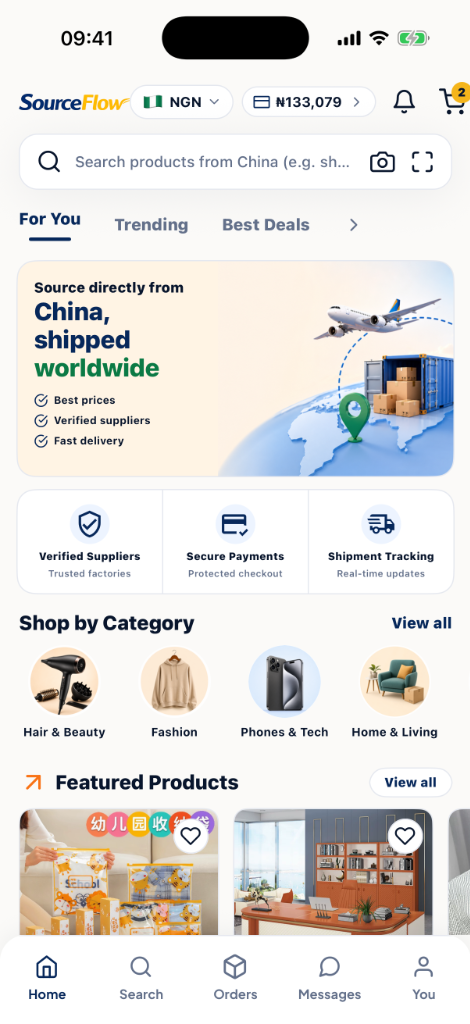
Crucial Testing Information: Read Before You Start
All wallet top-ups inside the beta app are simulated sandbox payments. When adding funds to your wallet, select bank transfer, card, or USSD, and Flutterwave will present a testing prompt. Do not use real cards, and do not input your actual bank login credentials. No real money will leave your account.
Every order checkout is purely for tracking purposes. We will not purchase the actual goods from Chinese sellers, and no shipments will be forwarded to your delivery address. Do not order items expecting them to arrive.
Your registration data, transaction logs, and order histories reside in a secure testing staging server. This database is completely separate from our future production launch and may be reset or wiped clean at any stage during the beta cycle.
How to Install the Beta
Get set up on your iOS device using Apple TestFlight, or view Android status.
Download TestFlight App
First, open the App Store on your iOS device, search for TestFlight, and install it. TestFlight is Apple's secure platform for testing beta applications.
Get TestFlight →Join SourceFlow Beta
Once you have the TestFlight app installed on your device, return to this landing page and tap the invitation button below to download and launch the SourceFlow app.
Join SourceFlow TestFlightAndroid Beta
We are currently finalizing our staging build for Android. The Google Play Console Beta testing program will be launching soon.
What to Look Out For
Help us identify bugs, translation errors, and friction points. Run through this checklist when using the app.
1. Search & Localization
Search for various wholesale products in English (e.g., "smartwatch", "t-shirt", "bag"). Are the search results relevant? Do the results load in a reasonable time? Are Chinese text and product specifications cleanly translated?
2. Sandbox Wallet Flow
Go to the Wallet tab, tap Top-up, and check out Flutterwave's sandbox form. Verify that your top-up reference is recorded in your transaction history and your balance increments correctly.
3. Cart & Variant Accuracy
Select product configurations (colors, sizes, bundles). Add them to your cart. Modify quantities and ensure details persist when you close and re-open the application.
4. End-to-End Order Flow
Complete a checkout. Check that your wallet balance is debited immediately. Verify the status updates in your Order Tracking section as admin simulates procurement.
5. Freight & Shipping Setup
When a shipping cost is calculated for your test order, try paying for it from your wallet (top up if needed). Look out for Air Freight vs. Sea Freight delivery estimates.
6. Notifications & Alerts
Make sure you receive app push notifications, order confirmation emails, and WhatsApp test alerts (if configured) when your order state changes.
Found a bug? Have feedback?
Your input is highly valuable to us! Whether you spot a typo in translations, an app crash, or a confusing step in the checkout flow, we want to hear it.
Take a screenshot in the app and tap "Share Beta Feedback" directly from the overlay.
Quick Bug Report / Feedback
Got a quick suggestion? Send it directly to our developers right now.